
Guide · CAN · OBD-II
Read your car’s live data with an ESP32 and CAN bus
Every car built since ~2008 speaks CAN through its OBD-II port. The ESP32 already has a CAN controller built in (Espressif calls it TWAI), so all you add is a $1 SN65HVD230 transceiver — and you can stream RPM, coolant temperature, speed and dozens of other values into your own dashboard.
If CAN’s dominant/recessive arbitration and differential pair are new to you, start with the CAN section of the interactive bus explainer — this post is the hands-on follow-up for actually pulling data out of a vehicle.
Why the ESP32 is perfect for this
- Built-in TWAI (CAN) controller — no MCP2515 SPI module needed, the peripheral is on the chip.
- But the ESP32’s pins are single-ended — CAN is differential, so you still need a
transceiver. The
SN65HVD230runs at 3.3 V, which pairs cleanly with the ESP32 (an MCP2551 is 5 V and needs level care).
Wiring to the OBD-II port
SN65HVD230              ESP32
----------              -----
CTX / D  (TX)     <--   TWAI TX  (e.g. GPIO5)
CRX / R  (RX)     -->   TWAI RX  (e.g. GPIO4)
VCC              -->    3V3        // 3.3 V transceiver — perfect for ESP32
GND              -->    GND
CANH / CANL      -->    OBD-II pins 6 (H) and 14 (L)
// The car's bus is already terminated — do NOT add 120 Ω at the OBD port.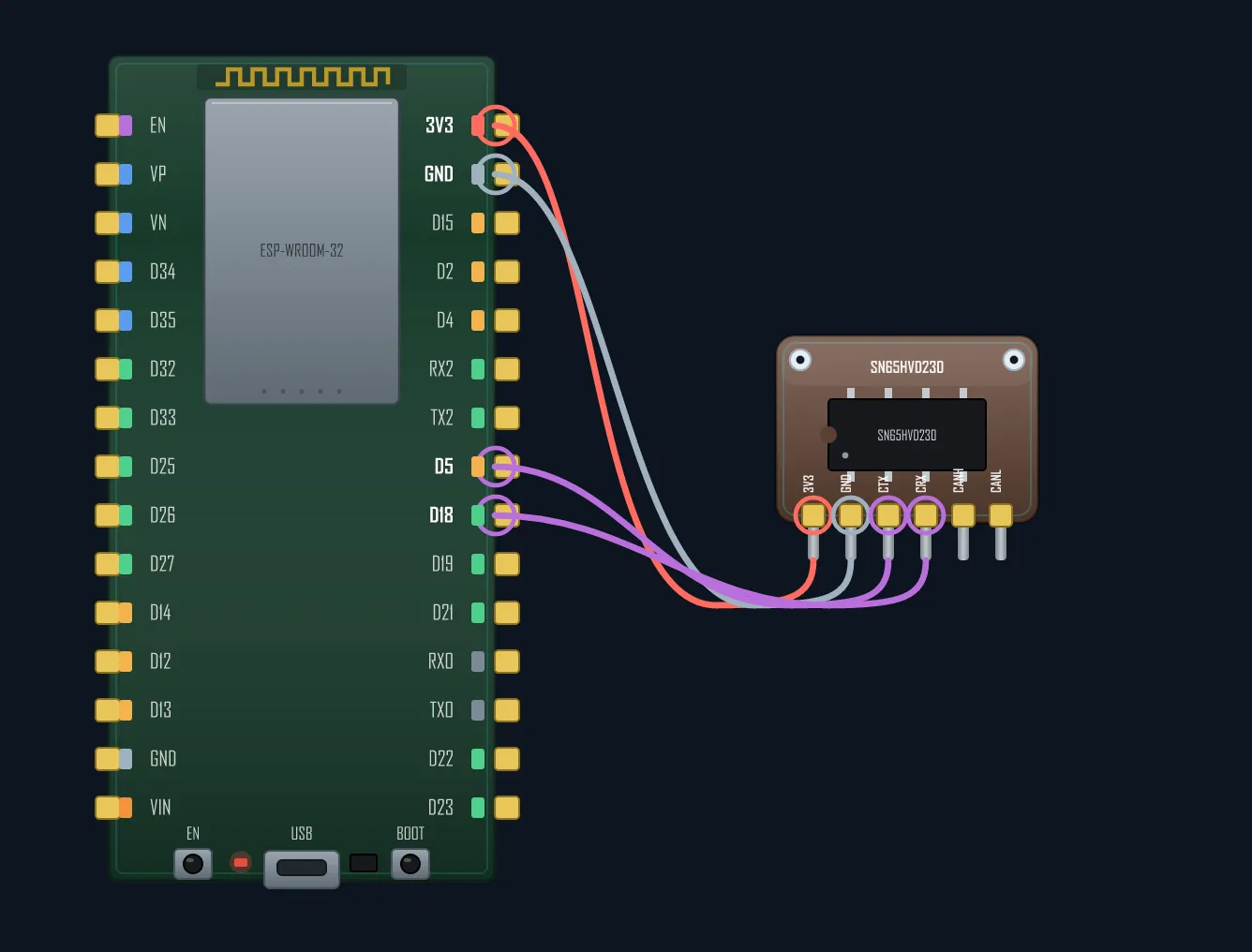
OBD-II pin 6 is CAN-H, pin 14 is CAN-L, and pin 16 gives you 12 V permanent power (use a buck converter down to 5 V for the ESP32). The vehicle’s bus already has its 120 Ω terminators — adding your own at the port will overload it.
Reading frames (listen-only)
Use the built-in driver/twai.h. The single most important setting is
TWAI_MODE_LISTEN_ONLY: it lets you receive without ever driving the bus,
so you physically cannot disturb the car. Bit rate for OBD-II is 500 kbit/s.
#include "driver/twai.h"

void setup() {
  Serial.begin(115200);
  twai_general_config_t g = TWAI_GENERAL_CONFIG_DEFAULT(
      GPIO_NUM_5, GPIO_NUM_4, TWAI_MODE_LISTEN_ONLY);   // read-only = safe
  twai_timing_config_t  t = TWAI_TIMING_CONFIG_500KBITS();  // OBD-II = 500 kbit/s
  twai_filter_config_t  f = TWAI_FILTER_CONFIG_ACCEPT_ALL();
  twai_driver_install(&g, &t, &f);
  twai_start();
}

void loop() {
  twai_message_t msg;
  if (twai_receive(&msg, pdMS_TO_TICKS(1000)) == ESP_OK) {
    Serial.printf("ID 0x%03X  [%d] ", msg.identifier, msg.data_length_code);
    for (int i = 0; i < msg.data_length_code; i++)
      Serial.printf("%02X ", msg.data[i]);
    Serial.println();
  }
}
Run that with the engine on and you’ll see a flood of frames — every module chattering. Now you just need to ask for specific values.
Asking for a value — OBD-II PIDs
OBD-II is a request/response layer on top of CAN. You send a query to ID 0x7DF (e.g.
mode 01, PID 0x0C = engine RPM) and the ECU answers on 0x7E8.
RPM decodes as (A*256 + B) / 4 from the response bytes. Swap the PID for
0x05 (coolant temp), 0x0D (speed), and so on — the PID list is standard.
For trucks and heavy equipment it’s J1939 on top of CAN instead, same physical bus.
Safety & gotchas
- Stay listen-only unless you truly know what you’re doing. Writing to a live vehicle bus can confuse modules — never experiment on a moving car.
- Bit rate must match — 500 kbit/s for most OBD-II; the wrong rate = zero frames or error storms.
- Transceiver is mandatory — do not wire CAN-H/L straight to GPIO.
- No extra termination at the OBD port; the car provides it.
- Filter to just the IDs you care about once it works — the raw bus is busy.
From here it’s a short hop to a self-hosted car dashboard: feed the decoded values into a few widgets and the ESP32 serves a live gauge cluster over Wi-Fi — no cloud, no app.
See CAN’s dominant/recessive arbitration move a byte, live.