 RisalDash GitHub Get started
 ESP32 · ESP8266 · C++
RisalDash brings up a responsive web dashboard in the brand style: widgets on one screen, real-time over WebSocket, offline-first first boot, AI (MCP) control, and an animated robot face. Prototype with built-in fake sensors — no hardware needed. Zero front-end code.
RisalUI dash("Greenhouse");

dash.gauge("Voltage", &volts, 0, 14, "V");
dash.chart("Temp", &temp, "°C").history(30);
dash.toggle("Pump", &pump, setPump);
dash.beginAP("Greenhouse", "12345678");The linker strips unused widget types — 0 bytes. A type you use adds ~1.3–3.4 KB (its CSS + JS + code).
AP + captive portal + Wi-Fi provisioning. System font, zero external requests — works with no internet.
Pushes only changed values. Widgets on one live screen, no reloads.
36 controls: metric, gauge, chart, toggle, slider, table, log, d-pad, joystick, map… + presets for 71 sensors.
EN / RU / AR out of the box. Only chosen languages are compiled in. Full RTL layout.
Every widget is an MCP tool. Claude/Cursor read sensors and flip relays by voice.
Build the whole dashboard with no hardware. 9 realistic bundles — power, air, IMU, weight, weather, battery, flow, health, gas — plus RisalFake give drifting, correlated readings (trend + noise, not a flat sine). Swap for the real driver later, sketch unchanged.
On an ESP32-S3 with an ES8311 mic the board records you → Whisper transcribes → Claude replies → OpenAI TTS speaks it back, and the robot eyes show the reply’s emotion. A full voice agent from the same sketch.
Stream internet radio through the ES8311 codec with an editable station list — drag to reorder, edit name/URL inline, add or remove. Saved to NVS and served from the dashboard.
AI
Animated emotive eyes with dozens of expressions — from happy and sleepy to listening, thinking and speaking — with idle blinking, on the web and the device LCD. Bind the emotion to your logic or an AI agent and the face reacts live.
Read: build an AI agentLive demo
The exact v0.2 UI the ESP serves — live. Swipe up to switch pages; tap the gear for theme, language and accent.
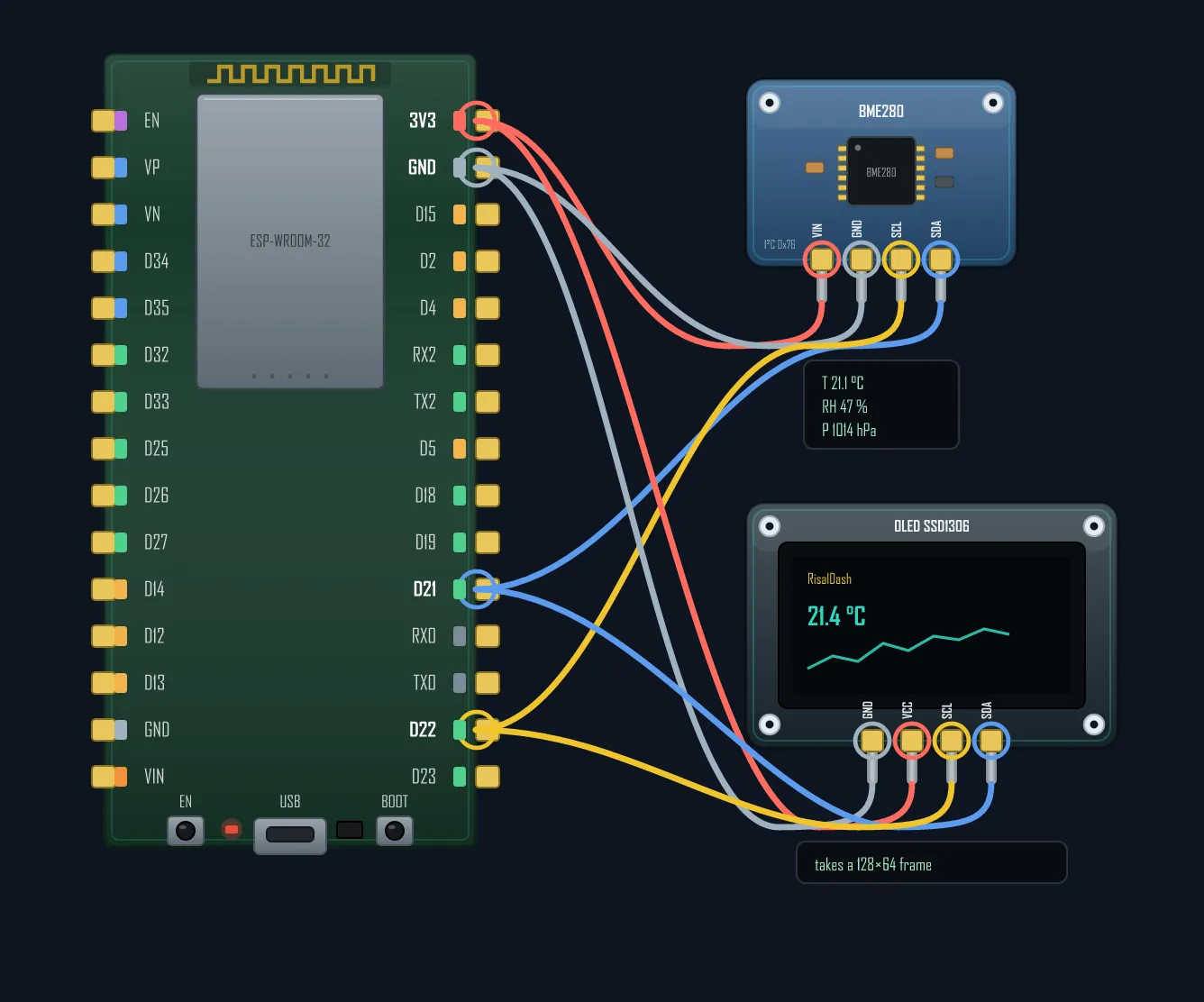
BoardLab
Pick a board, add any of 58 realistic modules — BoardLab routes the wires, warns about strapping-pin traps and exports a PNG. Free, no install. Every diagram on this site is drawn with it.
Open BoardLabAI control · MCP
Call enableMCP() and every widget becomes a Model Context Protocol tool — Claude reads your sensors and flips your relays, by chat or voice. Human dashboard and agent interface from the same few lines of C++.
// on the device — one line:
dash.enableMCP("risal_token");

// connect an agent — point the bridge at it:
RISAL_ESP_URL=http://192.168.1.42 \
RISAL_MCP_TOKEN=risal_token \
npx risal-dash-mcpLibrary Manager → "RisalDash"
lib_deps =
    RisalDash
    ESP Async WebServer
    AsyncTCP
Guide · Tools · IDE
Arduino IDE 2 to start, VS Code + PlatformIO for real projects, Thonny for MicroPython, KiCad for real PCBs, ESPHome for no-code nodes — what each is best at, plus BoardLab for wiring diagrams.
Project · HX711 · Load cell
A load cell + HX711 under the LPG bottle; the ESP32 subtracts the empty-bottle tare to show net kg and % left, with a red LED + buzzer before you run dry. Full sketch, runs with no hardware.
Guide · Motors · Drivers
The five motor types every project picks from — servo, stepper, brushed DC, geared TT and brushless — by control, driver, precision and torque, with working code for each and the wiring rules that save your board.
Free tool
An interactive pinout & wiring diagram maker for 36 boards — ESP32, Arduino, STM32, Pico and screen boards. Drag the pins, drop in real sensors, export a clean PNG. No Fritzing.