
Project · GPS · No cloud
Build an ESP32 / ESP8266 GPS Tracker with a self-hosted web dashboard
A NEO-6M and a $3 microcontroller serve a live map, home geofence, GPX track export and OTA updates — straight from the board. No cloud, no app, no subscription.
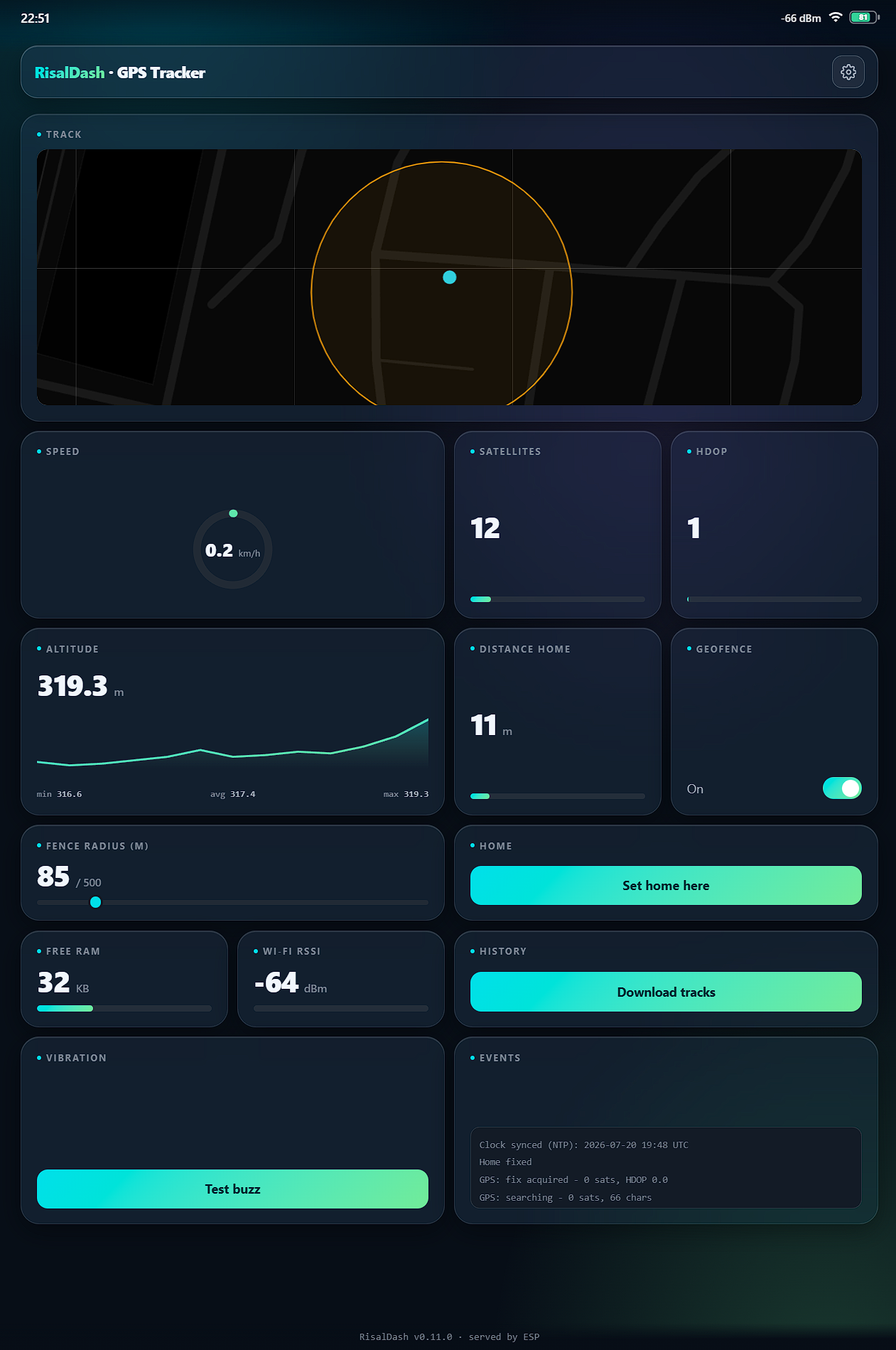
Most DIY GPS trackers push your location to someone else's cloud. This one doesn't. An ESP32 or ESP8266 and a $3 NEO-6M module serve a full web dashboard straight from the board — live map, speed, satellites, a home geofence with alarm, and GPX / CSV track export you can open in Strava, OsmAnd or Google Earth. No account, no app, no monthly fee.
It's built with RisalDash, an open-source Arduino library that turns a handful
of dash.metric(...) / dash.map(...) calls into a responsive, live
dashboard over WebSocket.
What it does
- Live map with trail — your position and the path you've driven, on OpenStreetMap tiles.
- Home geofence — a radius around "home"; step outside and it fires a vibration alarm (and optional Telegram message), debounced so it never chatters.
- Track logging — day-by-day CSV files written safely to flash. Works completely offline: drive with no Wi-Fi and it records the whole trip.
- One-tap export — a built-in
/trackspage lists every log with CSV and streaming-GPX links. - OTA updates — flash new firmware from the browser. No USB cable after the first upload.
- Self-hosted — the dashboard is served by the ESP; your location never leaves your network.
The hardware
- ESP8266 (Wemos D1 mini) or ESP32 — ~$3–5
- NEO-6M GPS module — ~$3
- Vibration motor for the alarm (optional) — ~$1
Wiring (ESP8266): NEO-6M TX → D5, RX → D6, VCC → 3V3, GND → GND; vibration motor on D1. A bare vibration motor draws ~70–100 mA and can't be driven from a GPIO (~12 mA) directly — put a transistor between the pin and the motor, with a flyback diode.
The code
The whole dashboard is declarative. This is essentially the entire UI:
#include <RisalDash.h>
RisalUI dash("GPS Tracker");

dash.map("Track", &lat, &lon).geofence(&homeLat, &homeLon, &fenceRadius);
dash.gauge("Speed", &speedKmh, 0, 40, "km/h");
dash.metric("Satellites", &sats);
dash.chart("Altitude", &altM, "m");
dash.link("History", "Download tracks", "/tracks");
dash.enableOTA();
dash.begin();          // captive portal, then joins your Wi-Fi
Feed the variables from TinyGPSPlus in loop(), and the map, gauges and
chart update live in every open browser. Custom endpoints (the track list, CSV download,
streaming GPX) hang off dash.server() on the same port.
Why no cloud matters
A tracker that phones home is a privacy liability and a subscription waiting to happen. Serving the dashboard from the device keeps your position on your LAN, keeps the tracker working when the internet is down, and leaves nothing to pay for or shut down. Away from home Wi-Fi it logs to flash; back on your network it auto-reconnects and you pull the day's GPX.
Complete, build-tested source for ESP32 & ESP8266.