
Guide · Interrupts · Timing
Ditch delay() — interrupts and millis() on Arduino & ESP32
The first thing everyone learns is delay(). The second thing everyone hits is its wall:
while delay(1000) runs, your board does nothing — it can’t read a button,
update a display, or keep Wi-Fi alive. Here’s the way out, in two steps: non-blocking timing with
millis(), and catching events the instant they happen with interrupts.
Step 1 — millis() instead of delay()
Most “I need a delay” moments really mean “do this every so often, but keep everything else running.”
That’s what millis() is for — it returns the milliseconds since boot, and you check how
much time has passed instead of freezing:
unsigned long prev = 0;
const unsigned long period = 1000;   // ms

void loop() {
  unsigned long now = millis();
  if (now - prev >= period) {
    prev = now;
    digitalWrite(LED_BUILTIN, !digitalRead(LED_BUILTIN));  // blink
  }
  // ...everything else keeps running here, no freeze
}
The loop never blocks: it just glances at the clock each pass. This one pattern replaces 90% of
delay() calls, and it’s what lets a board blink an LED, poll a sensor and serve a page at
the same time. But polling still has a gap — between two checks you can miss a fast event. That’s where
interrupts come in.
Step 2 — Interrupts: don’t poll, get notified
An interrupt is a hardware “tap on the shoulder”: when a pin changes, the CPU drops what it’s doing, runs a small function (the ISR — interrupt service routine), then returns exactly where it left off. You reach for one when you must not miss an event and can’t afford to poll for it:
- A button press — react the instant it’s down, no matter what
loop()is busy with. - A rotary encoder — pulses come too fast to poll reliably.
- A flow/pulse sensor — count edges without missing one.
- Waking from deep sleep on a pin (see deep sleep).
The wiring: a button that pulls to ground
The cleanest button needs no external parts: one leg to a GPIO, the other to GND, and you enable the
chip’s internal pull-up with INPUT_PULLUP. The pin idles HIGH and reads LOW when pressed —
so you trigger on FALLING.
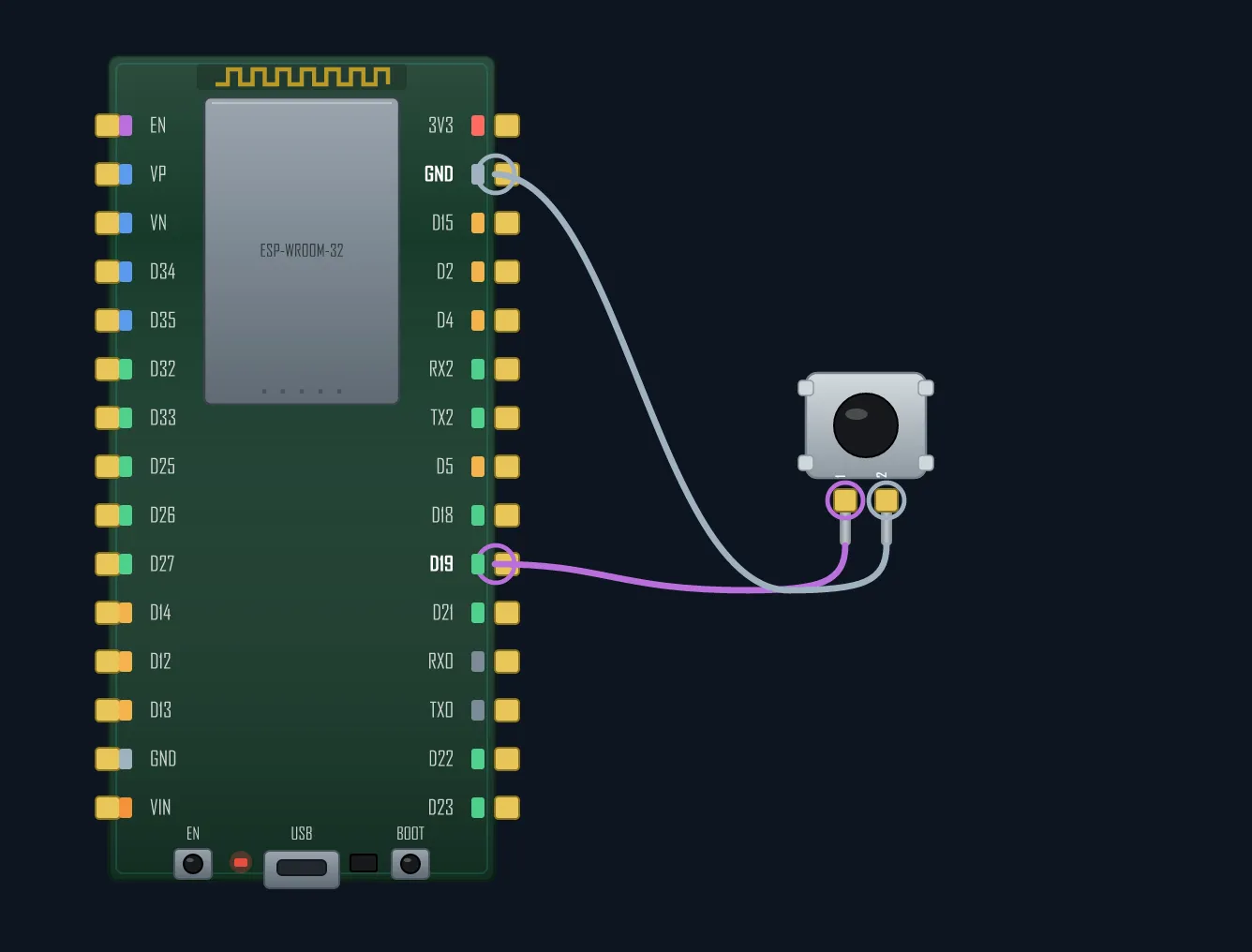
INPUT_PULLUP means no external resistor. Built in BoardLab.Almost any ESP32 GPIO can be an interrupt; on a classic Uno only D2 and D3 can. Always
wrap the pin in digitalPinToInterrupt() — it maps the pin to the right interrupt line.
One catch on the ESP32: the input-only pins GPIO34–39 have no internal
pull-ups, so a button there really does need an external ~10 kΩ resistor to 3V3.
Step 3 — Debounce, or one press counts as five
A mechanical button doesn’t make one clean edge — the contacts bounce, chattering HIGH/LOW for a few milliseconds. Left alone, the ISR fires several times per press. The fix is to ignore any edge that lands too soon after the last one:
const byte BUTTON = 19;               // your interrupt pin
volatile uint32_t presses = 0;
volatile uint32_t lastUs  = 0;

void IRAM_ATTR onPress() {             // ESP32: the ISR must live in IRAM
  uint32_t now = micros();
  if (now - lastUs > 25000) {          // ignore bounces within 25 ms
    presses++;
    lastUs = now;
  }
}

void setup() {
  Serial.begin(115200);
  pinMode(BUTTON, INPUT_PULLUP);       // button to GND, no external resistor
  attachInterrupt(digitalPinToInterrupt(BUTTON), onPress, FALLING);
}

void loop() {
  static uint32_t shown = 0;
  if (presses != shown) {              // do the slow work OUT here, not in the ISR
    shown = presses;
    Serial.printf("presses: %u\n", shown);
  }
}
The micros() guard swallows bounces inside 25 ms while staying responsive to real presses.
Prefer hardware? A 100 nF cap across the button (or an RC filter) smooths the edge instead — but the
software guard is free and good enough for almost everything.
The ISR rules that actually bite
- Keep it short. Set a flag or bump a counter, then handle it in
loop(). A long ISR blocks everything else, including Wi-Fi. - Share with
volatile. Any variable touched by both the ISR andloop()must bevolatile, or the compiler may cache a stale copy. - ESP32: mark the ISR
IRAM_ATTR. It must run from RAM — without it the board can crash when the interrupt fires during a flash operation. - No
Serial,delay(), or heavy work inside the ISR. Print and compute out inloop(), as the example does. - Multi-byte values aren’t atomic on 8-bit AVR. Reading a
longthat the ISR updates? Briefly disable interrupts (noInterrupts()/interrupts()) around the read.
Put together: millis() kills the everyday delay(), and interrupts catch the
events you can’t afford to miss. Once both are muscle memory, your board stops stuttering and starts
doing several things at once — on the ESP32 you can then go further and put work on the
second core.
Wiring a button or sensor to the right pin? Check it’s interrupt-capable and free first.