
Tool · BoardLab · Wiring
Draw ESP wiring diagrams in the browser — no Fritzing install
You finish a project and go to write it up — a README, a build log, a forum answer — and you need a clean picture of the wiring. Your options are usually: install Fritzing, fight a breadboard layout, and screenshot it; or hand-draw ASCII art that nobody enjoys reading. BoardLab is the shortcut: an online wiring-diagram maker built specifically for ESP and friends — pick a board, drag the pins, drop in real sensors, and export a crisp PNG.
It runs in the browser — nothing to install. Every diagram below was exported straight from it.
Open BoardLab →Every board and part in BoardLab is drawn from data, not painted by hand. Switch the board and the pins recompute; tap a pin and it tells you its GPIO number, whether it’s safe or a strapping pin, and — on boards with a built-in screen — whether the display already owns it. That’s the bit a generic drawing tool can’t do.
What you get
- 36 boards — ESP32 (incl. C6, S2, H2, C3, S3), ESP8266, Arduino (Uno R3/R4, Nano, Nano ESP32, Mega), STM32 (Blue Pill, Black Pill, Nucleo), Raspberry Pi Pico / Pico 2, XIAO, Teensy, Waveshare Zero, plus screen boards (T-Display-S3, Cheap Yellow Display, Heltec, M5Stack, the Waveshare Touch-LCD line).
- ~57 modules — real sensors and parts with their true pin lists: BME280, SCD40, MPU-6050, VL53L0X, INA226, DS18B20, HC-SR04, relays, WS2812, and now RS-485 / CAN transceivers.
- Wire any pin to any pin — drag from a board pin to a module pin, module-to-module, or across a discrete part (resistor, capacitor, transistor…). Double-click a wire to delete it.
- A pin inspector — roles, GPIO numbers, ADC channels, strapping/boot warnings, and the display/touch/SD map on screen boards.
- PNG export — one click, a clean 2× image on a dark background, ready to drop into a README, a slide, or a blog post.
Make a diagram in four steps
- Pick your board from the dropdown — it’s grouped by family (ESP32, Arduino, STM32, screen boards…).
- Add the modules you’re using. They come in with their real pin names and bus badge (I²C address, etc.).
- Wire it — drag from a board pin to a module pin. The wire takes the net colour (red = 3V3, orange = 5V, grey = GND, blue/yellow = SDA/SCL). Need a pull-up or a divider? Add a resistor as its own part and wire it inline.
- Export the PNG and you’re done. Switch the board first if you want the same hookup recomputed for a different one.
Three hookups people actually search for
The tool ships with ready examples you can open and edit. Three of the most common:
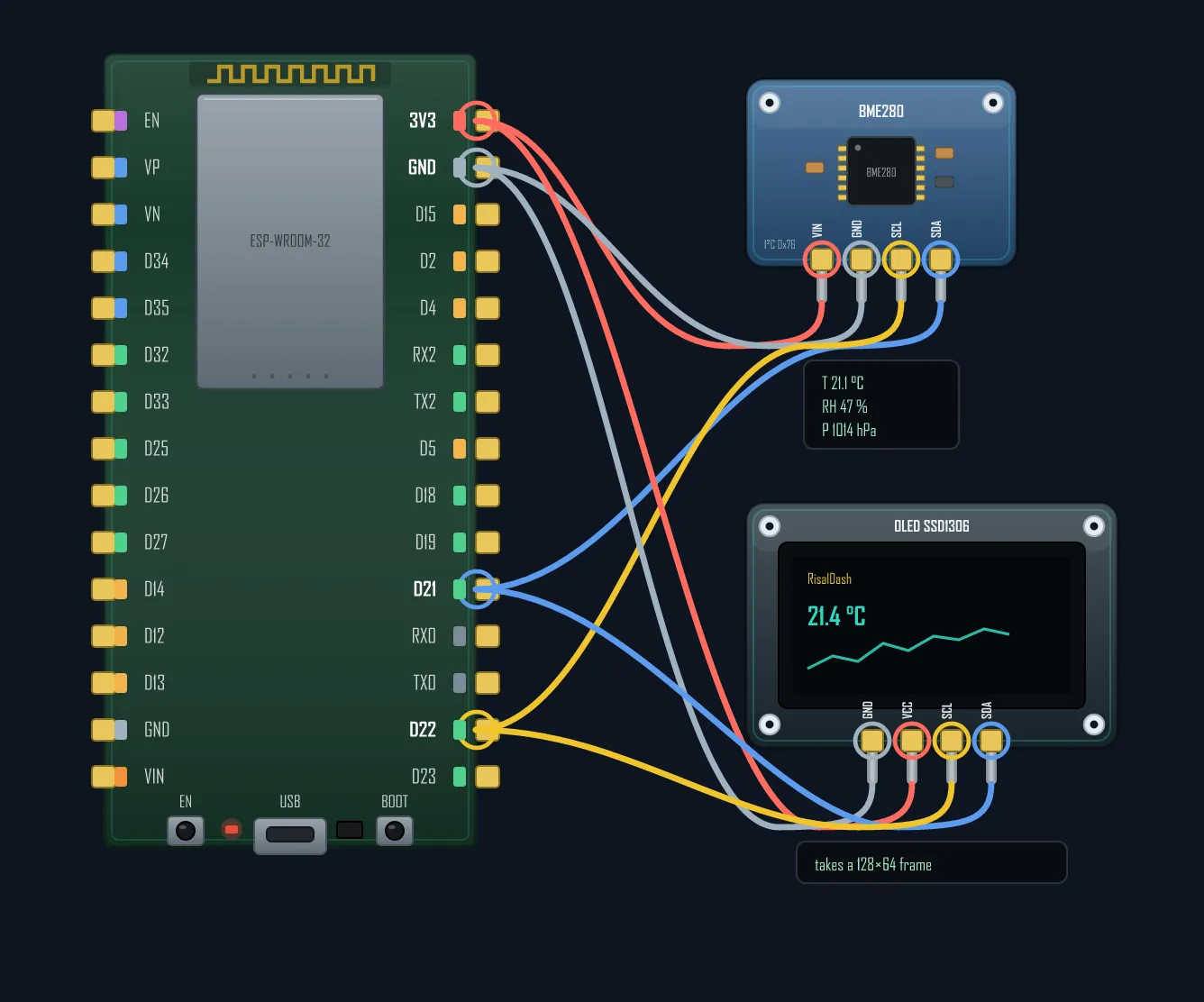
BME280 / SSD1306 on one I²C bus
Two devices, two wires, different addresses (0x76 and 0x3C). If yours won’t show up, that’s a whole separate rabbit hole — see why an I²C sensor goes silent.
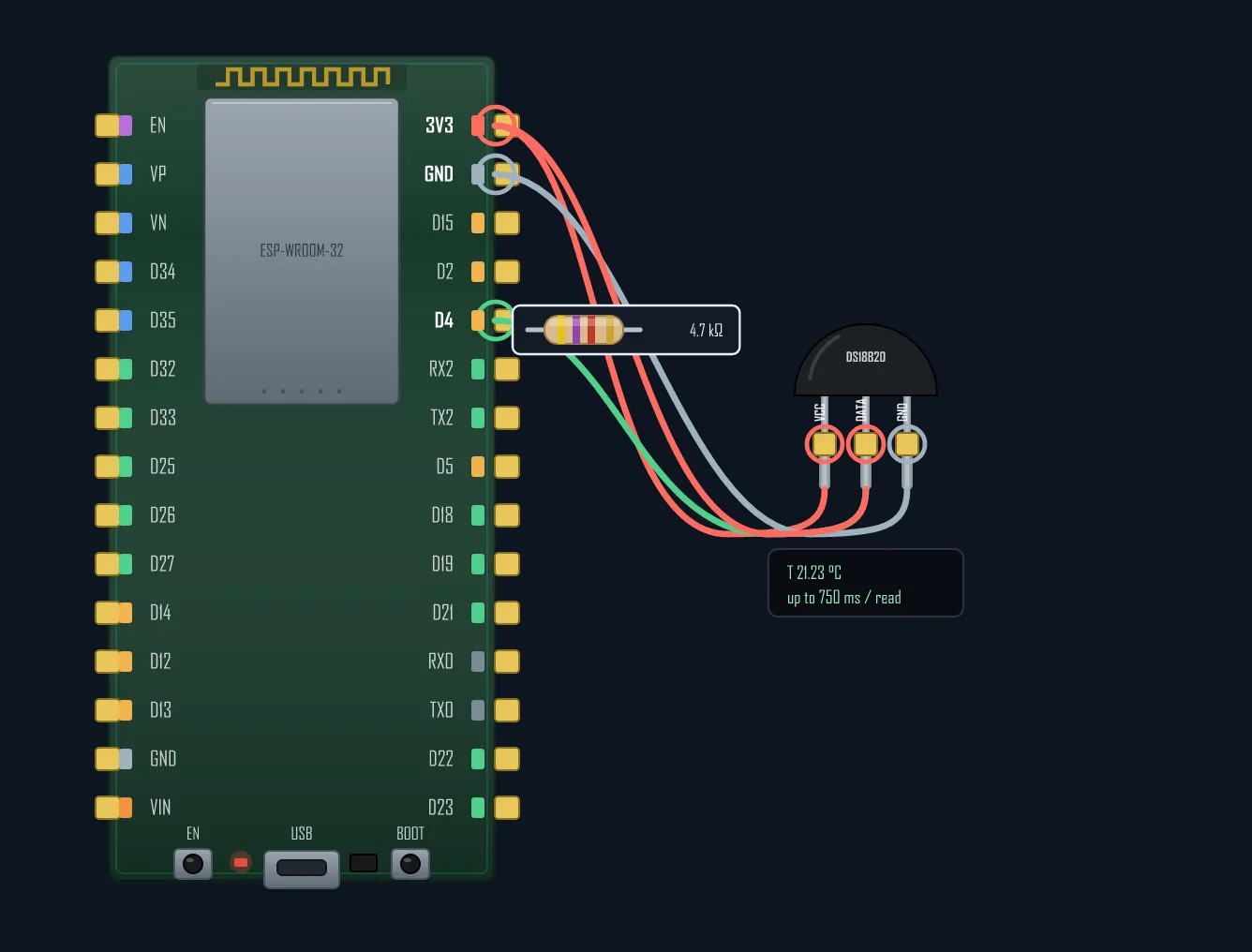
DS18B20 with its 4.7 kΩ pull-up
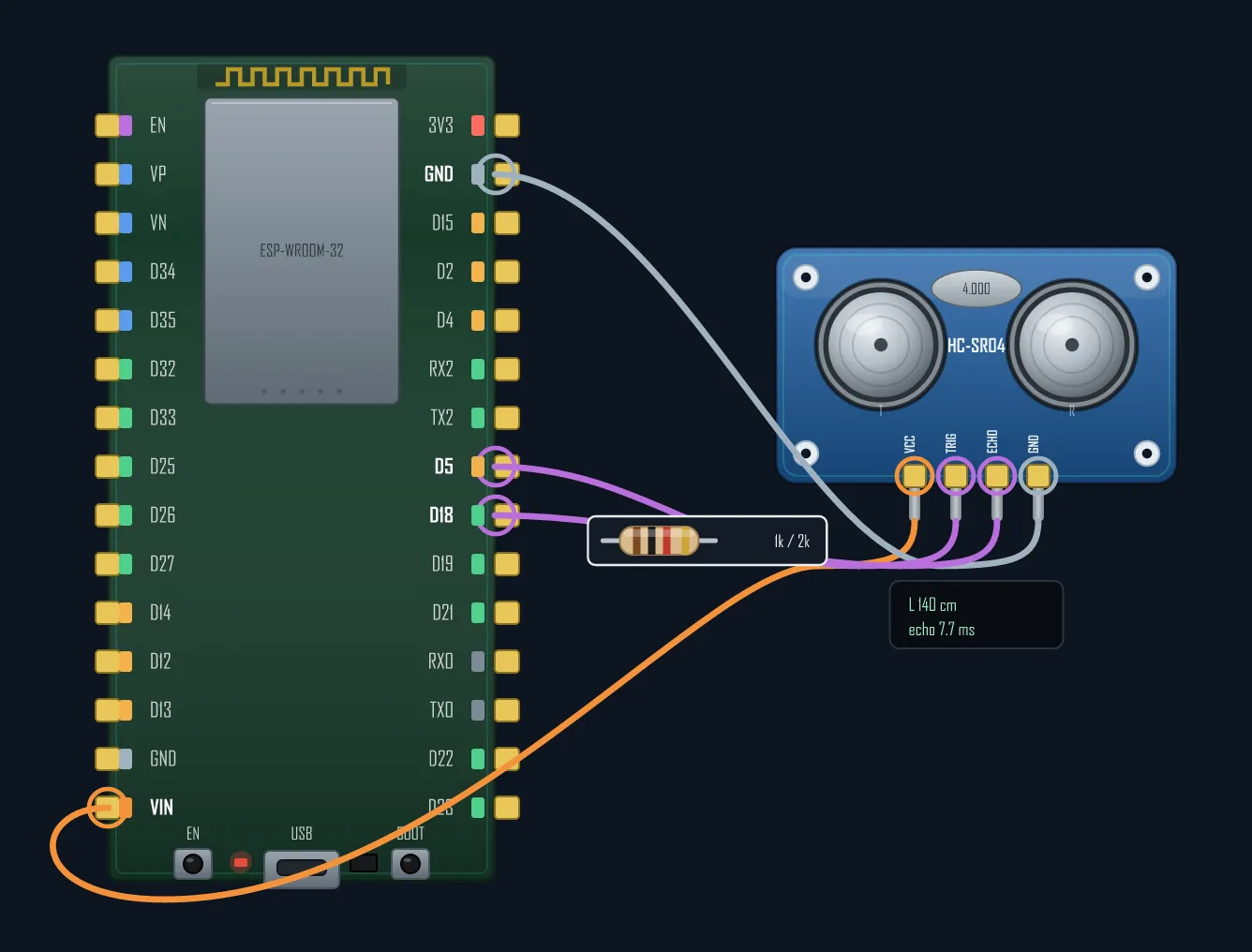
HC-SR04 with a 1k/2k divider
The rangefinder answers with a 5 V Echo, and an ESP pin isn’t 5 V-tolerant. The divider is the fix — and BoardLab draws it inline. More on the general case in 3.3 V ↔ 5 V level shifting.
Why not Fritzing, Wokwi or circuito.io?
They’re all good at what they do — this is just a different job. BoardLab is the quickest path from “I need a wiring picture” to “here’s the PNG.”
| Tool | What it is | The catch for a quick diagram |
|---|---|---|
| BoardLab | Browser wiring-diagram maker, ESP-focused | Not a simulator — it draws the hookup, it doesn’t run the code |
| Fritzing | Desktop breadboard/PCB editor | A paid download and install; heavier than a README needs |
| Wokwi | Online simulator | Brilliant for running code; the diagram is a side effect, not the point |
| circuito.io | Circuit generator + BOM | Generates a full schematic/BOM — more than a quick pin map, and less ESP-pin detail |
Where BoardLab wins: it’s instant and online, it knows ESP pins (strapping, ADC2-vs-Wi-Fi, native-USB, display-owned pins), and it hands you a clean PNG in the tool’s own style. Where it doesn’t compete: it isn’t a simulator and it isn’t a PCB tool.
Good for more than blog posts
- READMEs & docs — a wiring PNG beats a paragraph of “connect SDA to GPIO21…”.
- Teaching — the pin inspector explains why a pin is or isn’t safe.
- Planning a build — check what’s free before you solder, especially on a screen board where half the GPIOs are already spoken for.
- Answering forum questions — drop a diagram instead of describing it.
Open it, pick your board, and export your first diagram in about a minute.