
Guide · FreeRTOS · Dual-core
Put work on the ESP32’s second core with FreeRTOS
A classic ESP32 has two CPU cores, but your Arduino loop() only ever runs on
one of them. The moment a slow sensor read or a chunk of parsing lands in loop(), the web page
lags and Wi-Fi hiccups. The fix is already on the chip: FreeRTOS. Spawn a task, pin it to
the other core, and the two run side by side.
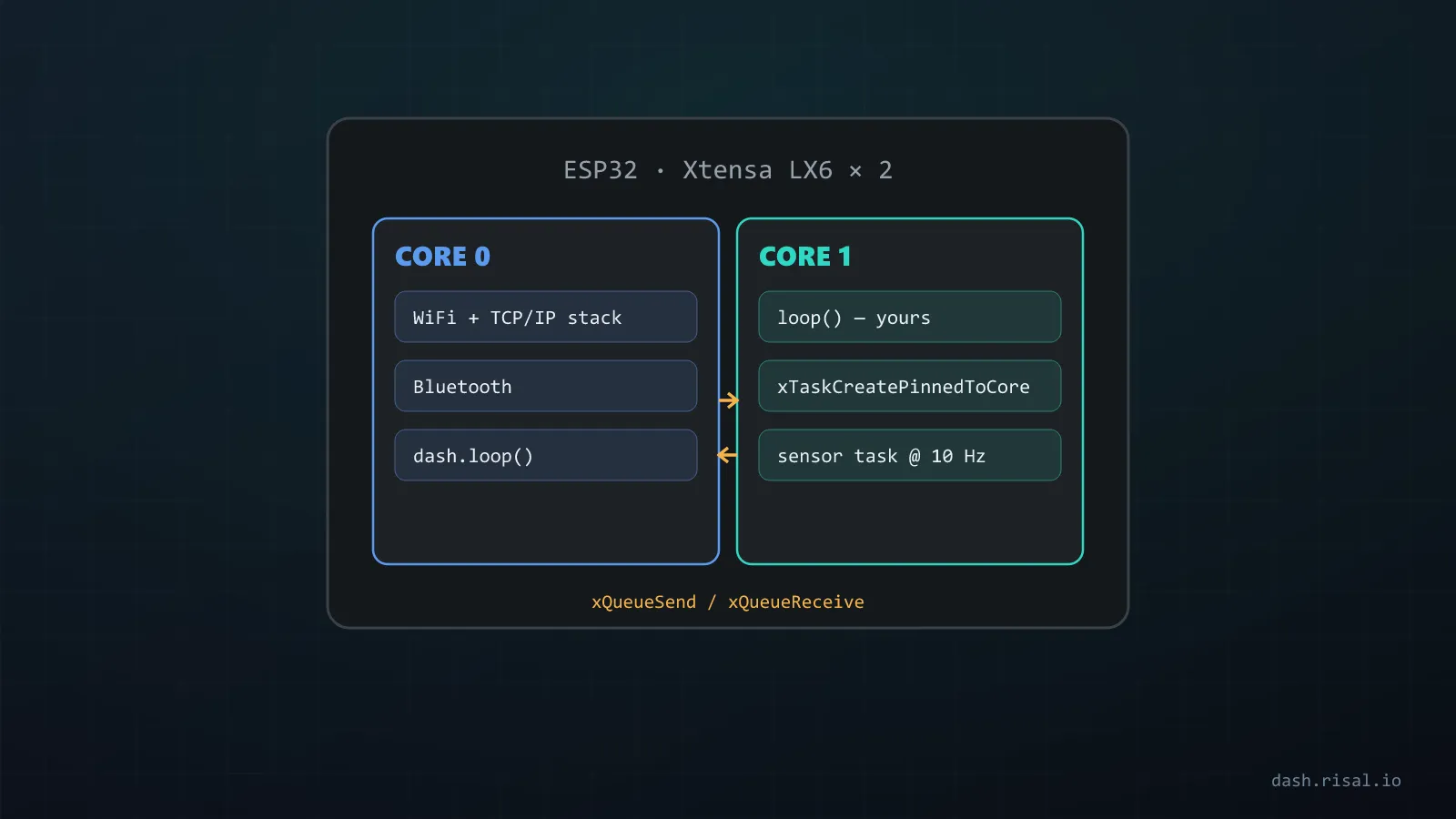
This is the step up from millis() and interrupts: those keep a single loop from blocking; FreeRTOS lets you run several loops at once, on real hardware cores.
You’re already using it
The ESP32 Arduino core runs on top of FreeRTOS. Your setup()/loop() is itself a
task — the loopTask, pinned to core 1. The Wi-Fi/Bluetooth stack runs its
own tasks, mostly on core 0. So “adding a task” isn’t exotic — you’re just creating one
more of what the system already does.
A task of your own
A task is a function with an endless for(;;) loop that never returns. You create it once and
the scheduler runs it forever, slicing CPU time between it and everything else. The one rule that trips
people up: inside a task, use vTaskDelay(), never delay() — vTaskDelay
hands the CPU back to other tasks while it waits.
Pin it to the second core
Use xTaskCreatePinnedToCore() and give it core 0 — that keeps your heavy
work off core 1, where loop() and the web server live:
void sensorTask(void *pv) {
  for (;;) {
    float t = readTemp();              // your slow work
    Serial.printf("temp: %.1f\n", t);
    vTaskDelay(pdMS_TO_TICKS(1000));   // yield — never delay() in a task
  }
}

void setup() {
  Serial.begin(115200);
  xTaskCreatePinnedToCore(
    sensorTask,   // function to run
    "sensor",     // name (for debugging)
    4096,         // stack in bytes — too small = crash/reboot
    NULL,         // parameter
    1,            // priority (higher = more urgent)
    NULL,         // task handle (optional)
    0);           // core 0 — leave core 1 for loop() + Wi-Fi
}

void loop() {
  // core 1: keep the web server / UI / Wi-Fi responsive
}
The seven arguments are: the function, a name, the stack size, a parameter, the priority, an optional handle, and the core (0 or 1). Two of those bite first-timers: too small a stack and the task crashes the moment it uses a bit of memory; and priority is relative — a high-priority task that never yields will starve everything below it.
Passing data between cores — use a queue
The trap now is sharing data. A plain global written on core 0 and read on core 1 can tear or read
stale — volatile alone isn’t enough for anything bigger than one aligned word. The clean way
is a queue: one task posts values, the other receives them, and FreeRTOS handles the
locking:
QueueHandle_t q;

void producer(void *pv) {
  for (;;) {
    float v = readTemp();
    xQueueSend(q, &v, 0);              // hand the value across — no shared globals
    vTaskDelay(pdMS_TO_TICKS(1000));
  }
}

void setup() {
  q = xQueueCreate(8, sizeof(float));  // room for 8 floats
  xTaskCreatePinnedToCore(producer, "prod", 4096, NULL, 1, NULL, 0);
}

void loop() {
  float v;
  while (xQueueReceive(q, &v, 0) == pdTRUE)   // core 1 drains it safely
    Serial.println(v);
}
Queues are perfect for a producer/consumer split — a sensor task measuring, the UI task displaying. For a
shared structure you touch from both sides, guard it with a mutex
(xSemaphoreCreateMutex()) instead. Rule of thumb: pass copies through a queue, don’t
share globals.
Gotchas that reboot the board
- Stack too small. 1–2 KB is fine for a blinker; anything touching Wi-Fi, JSON or
Stringwants 4–8 KB. A stack overflow reboots instantly. delay()inside a task blocks that core’s scheduler slot — usevTaskDelay(pdMS_TO_TICKS(ms)).- The core-0 watchdog. A greedy task on core 0 that never yields trips the task
watchdog and panics. Always
vTaskDelay()at least once per loop. Serialfrom two tasks can interleave; for real logging, funnel prints through one task (a queue again).- Priorities are relative. Don’t make everything high — start most tasks at 1.
⚠ Which ESP chips are actually dual-core
- Two cores: the classic ESP32 and the ESP32-S3. Here pinning to core 0 buys you real parallelism.
- Single core: ESP32-C3, C6, S2, H2. FreeRTOS tasks still work — the
scheduler time-slices them — but there’s no second core to pin to.
xTaskCreatePinnedToCore(…, 1)just runs on core 0. Great for structure, not for splitting load. - No FreeRTOS (Arduino core): the ESP8266 runs a single cooperative
loop. No
xTaskCreate— lean on millis() and interrupts instead. Not sure what you’ve got? See the chip guide.
The pattern that pays off almost every project: keep loop() for the network and the
UI, and push blocking work — a sensor, a file, a parse — onto a pinned task that talks back through a
queue. The board stops stuttering, and the dashboard stays smooth while the sensors do their thing.
Not sure your board has a second core — or which pins are free for the sensor task?